
Every modern professional faces the same daily administrative bottleneck: drowning in heavy, repetitive document processing. You spend your morning scraping text from industry websites, your afternoon copy-pasting data from scattered PDFs into Word documents, and your evening trying to clean up messy data tables for a presentation.
Traditionally, automating these office tasks required intermediate Python knowledge, complex scripting, or expensive enterprise software licenses. For solo founders, researchers, and project managers, manual data handling creates a massive operational drain that completely stalls strategic business growth.
Shifting from Manual Entry to AI-Driven Micro-Tasks
In 2026, building optimized office automation pipelines no longer requires an information technology background. The software landscape has shifted from rigid, pre-programmed macros to flexible, intelligent application logic driven by plain English instructions. Instead of manually mapping cell formulas or writing complex text parsers, creators use conversation to define how information should be gathered and structured.
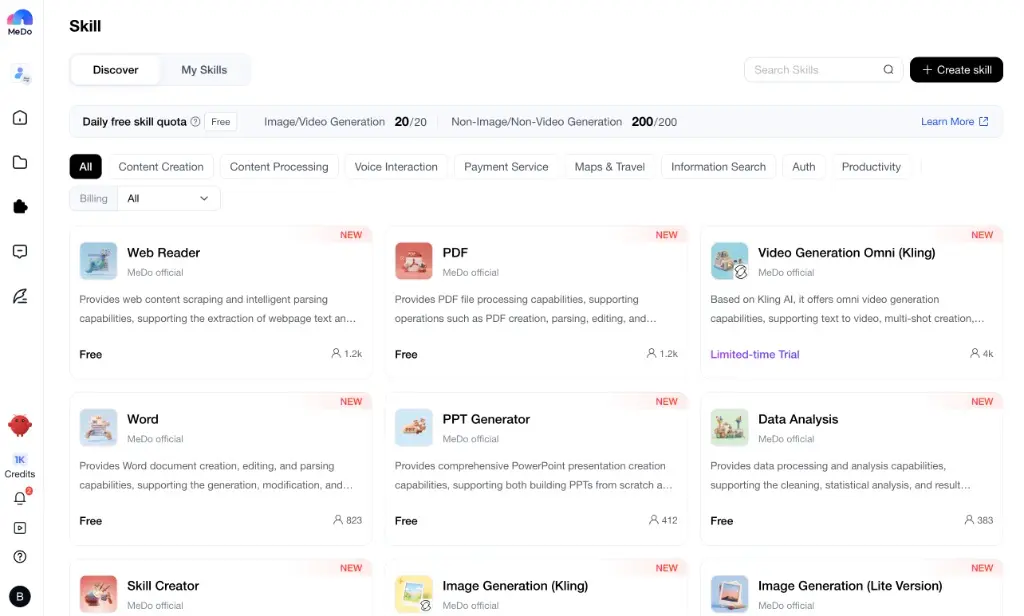
By utilizing a cloud-native creation platform, you can orchestrate multi-step document workflows instantly. You simply describe the intake rule, specify how the data should be transformed, and let the background system execute the pipeline. This allows teams to eliminate routine data entry overhead entirely and shift their entire focus to analyzing insights and making executive decisions. As shown in the MeDo Skill discovery dashboard above, expanding your workspace’s capabilities is entirely modular, giving you instant access to pre-built official extensions for advanced document processing and data scraping.
Supercharging Workflows with Modular Office Skills
A truly efficient web application needs to interact smoothly with standard business file formats. A flat database is only useful if you can easily pull external information into it and push professional reports out of it.
To bridge this gap, modern application ecosystems leverage modular capabilities called Skills. Instead of writing complex software integration protocols or linking unstable third-party application programming interfaces (APIs), creators drop dedicated data components directly into their application environments.
Platforms like MeDo streamline this data plumbing perfectly by providing an official marketplace of native tools. If your application needs to ingest an industry report, you can utilize the PDF or Web Reader skills to automatically scrape, parse, and clean the text. If you need to generate client deliverables, plugging in the Word or PPT Generator extensions allows your app to output beautifully formatted corporate templates automatically based on real-time user inputs.
Turning Raw Information into Immediate Business Insights
Beyond basic text formatting, modern business operations depend heavily on rapid statistical evaluation. Managing massive rows of raw user feedback or operational metrics in static sheets makes it incredibly difficult to spot scaling trends early.
By integrating dedicated Data Analysis modules into your custom internal tools, you can automate statistical calculations, trigger automated data cleaning routines, and render data summaries instantly. Combined with flagship multimodal tools like Kling AI for high-end graphic creation or advanced Large Language Models, your custom workspace transforms into an autonomous intelligence hub. You enjoy the immense speed of AI execution while maintaining total control over your business logic.
3 Office Automation Blueprints You Can Build This Week
- Automated Research Aggregators: Build a custom portal that utilizes the Web Reader to scan industry blogs, extracts the key data points via AI, and automatically compiles them into a structured weekly digest.
- Instant Client Report Engines: Design a dashboard that ingests raw operational metrics, routes them through the Data Analysis engine, and outputs a polished, fully editable corporate draft using the Word or PPT Generator skills.
- Smart Document Onboarding: Create a secure internal intake form that parses incoming customer contracts via the PDF skill, updates your central tracking database, and alerts your team of key contract milestones automatically.
Conclusion: Stop Pushing Pixels, Start Automating
The true value of a modern creator, marketer, or project leader lies in high-level strategic alignment, brand positioning, and executing critical business goals—not in manually reformatting text files or copy-pasting data across browser tabs.
By leveraging an intelligent development ecosystem like MeDo, you can convert complex file engineering into a straightforward conversational setup. Take advantage of generous daily free skill quotas, select the document extensions your team needs, and transform your daily routine. Stop fighting with messy administrative tasks—modernize your office workflow and start building today.
Also Read
- 4 Practical Ways To Stretch Any Tech Budget
- Metaphors for Life: 30+ Powerful Ways to Describe Life’s Journey
- How Smart Workplace Technology Is Reshaping Comfort and Efficiency in Modern Facilities